Showing posts with label Command. Show all posts

Thursday, April 25, 2024

Why Does Raytac AT-Command Module Not Require An End Code Mechanism?

Developers may be familiar with using ‘\n’ (hex 0x0A) or ‘\r’ (hex 0x0D) as end codes to determine the end of a data packet when writing programs. In the original Nordic SDK example code, ble_app_uart, is to consider the reception of 244 bytes or the presence of ‘\n’ (hex 0x0A) or ‘\r’ (hex 0x0D) as end code as the end of a data packet. The program then sends this received data via BLE to APP.


Developers encountering Raytac AT-Command module for the first time may find it very unfamiliar and be puzzled by the absence of 0x0A or 0x0D end code. You may raise questions about how to receive complete information without relying on these end code? Therefore, we’ll provide explanations for common use cases of AT-Command in both connected and disconnected scenarios:


In the connected condition –
Raytac’s AT-Command module operates in Pass-Through mode. For instance, when the APP sends 0x41 0x42 0x43 (3 bytes) through the module to the MCU, the MCU will receive only 0x41 0x42 0x43 (3 bytes). When APP sends these 3 bytes, there is no need to include the 0x0D end code or 0x0A end code at the end. The same approach applies when the direction of transmission is reversed (i.e., when the MCU sends to the module and then to the APP).

Here, it’s crucial to note that there is a specific consideration for the “Data Interval” (DI) setting between transmitting one data packet and the next. Failure to configure the DI appropriately may result in packet loss and lead to Bluetooth disconnection shortly after data transmission. The recommended DI values vary at different Baud rates, and you can refer to the AT-Command specification for suggested DI values.
As an example, consider Raytac AT-Command module in the scenario of “Mobile App -> Module (MDBT42V-AT) -> MCU,” with a Baud rate of 9600, no flow control, and a data length of 244 bytes. In this case, the DI value for transmitting data must be at least 250ms to prevent packet loss.


In the unconnected condition –
Providing explanations to the Bluetooth module by sending AT commands from the MCU (or Console) is illustrated below. There is no need for 0D or 0A end codes at the end.
AT?NAME
AT+NAMESQ-BT
AT?NAME


Edited by Sales Manager: Ms. Vicky Huang


Raytac Corporation 勁達國際電子股份有限公司  A company of Abietec
Bluetooth & WiFi module maker based on Nordic nRF54, nRF53, nRF52, nRF7002 solution
BT5.4 &BT5.3 & BT5.2 & BT5.1 Qualified, FCC/IC/CE/Telec/KC/RCM/SRRC/NCC Pre-Certified. Bluetooth Solution: nRF54, nRF5340, nRF52840, nRF52833, nRF52832, nRF52820, nRF52811, nRF52810, nRF52805, nRF51822 WiFi Solution: nRF7002
http://www.raytac.com
email:service@raytac.com
Tel: +886.2.3234.020

Wednesday, November 22, 2023

Navigating RF Certification: A Guide to DTM and Radio Testing

 RF Test – DTM & Radio Test

When launching new products, there is a requirement for RF testing, and two methods are commonly used:

DTM (Direct Test Mode) and Radio Test.


Nordic's SDK provides two RF testing programs: DTM (Direct Test Mode) and Radio Test. While both methods can test RF indicators, they have some distinctions. DTM follows the Bluetooth specification's Direct Test Mode data format (referenced in Bluetooth Core Specification Version 5.2, Vol. 6, Part F.), primarily for Bluetooth certification tests.

On the other hand, Radio Test focuses on the chip's radio indicators, making it more suitable for FCC and ETSI certifications.

Let's delve into detailed explanations for DTM and Radio Test programs.


DTM(Direct Test Mode)

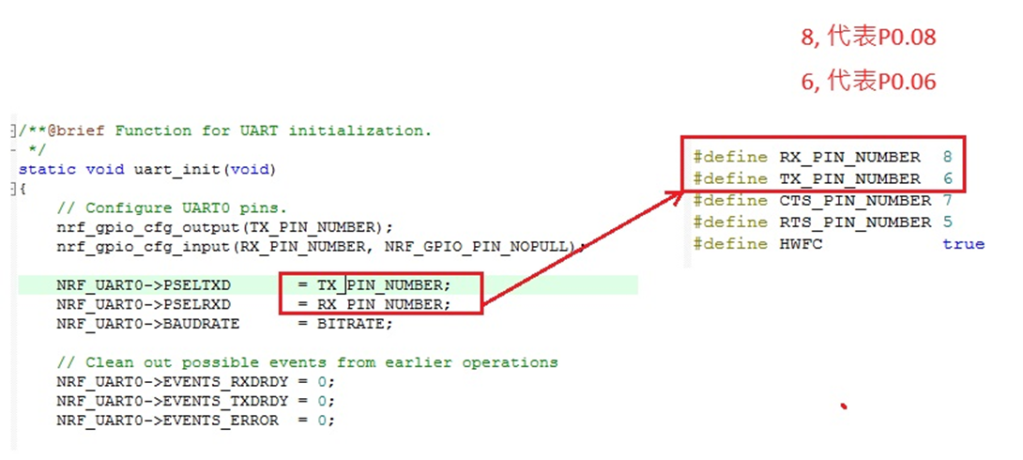
The Bluetooth Association offers a feature for testing RF characteristics. Nordic has incorporated DTM firmware into the SDK according to SIG standard documents. Customers only need to modify the Baud Rate and UART TX/RX pins to conduct RF tests.

1. Download and install nRF Connect for desktop software and nRF5 SDK from the Nordic website.

nRF Connect for desktop download:

https://www.nordicsemi.com/Software-and-tools/Development-Tools/nRF-Connect-for-desktop/Download


nRF5 SDK download:

https://www.nordicsemi.com/Software-and-tools/Software/nRF5-SDK/Download#infotabs


2. Install the Direct Test Mode program in the nRF Connect for desktop software.


3. Extract the SDK package, open the DTM example code from

nRF5_SDK_vxx\examples\dtm\direct_test_mode\ board number\blank, modify TX and RX pins based on the target board's definitions, then compile.

Download the program to the target board connected to the PC.
(Select the appropriate sample code based on the IC/module for testing, referring to the  board number below. )


IC P/Nboard number
NRF52832pca10040
NRF52810pca10040e
NRF52840pca10056
NRF52811pca10056e
NRF52833pca10100
NRF52820pca10100e

RF testing is performed using UART TX/RX commands.
The SDK program defaults to certain positions, but users can modify these two pin positions according to their product design without changing the Baud Rate setting.

UART PinnRF51nRF52
TXDP0.09P0.06
RXDP0.11P0.08


4. Use nRFConnect DTM for testing by adjusting UART TX/RX pins.

Please refer to Video tutorial from link below:
https://github.com/NordicSemiconductor/pc-nrfconnect-dtm/blob/master/resources/screenshot.gif


Radio Test

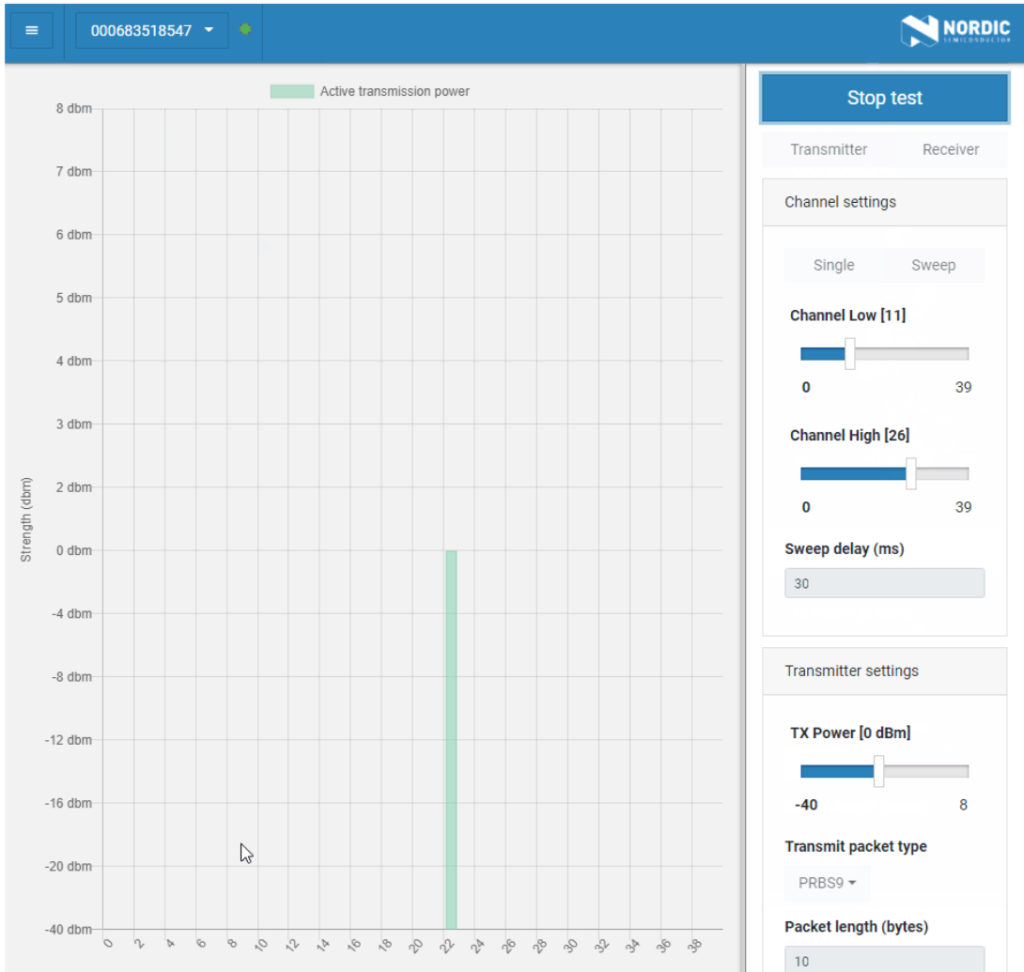
Nordic provides a tool for simpler RF testing, allowing the configuration of radio-related data such as TX power, frequency, TX carrier, and TX modulation carrier through a Command List. It doesn't include testing for RX sensitivity; if needed, users must either write a program for this test or use DTM for testing.

1. Open from nRF5_SDK_vxx\examples\peripheral\radio_test\board number\blank
(Based on the IC/module for testing, referring to the board number below.)

IC P/Nboard number
NRF52832pca10040
NRF52810pca10040e
NRF52840pca10056
NRF52811pca10056e
NRF52833pca10100
NRF52820pca10100e


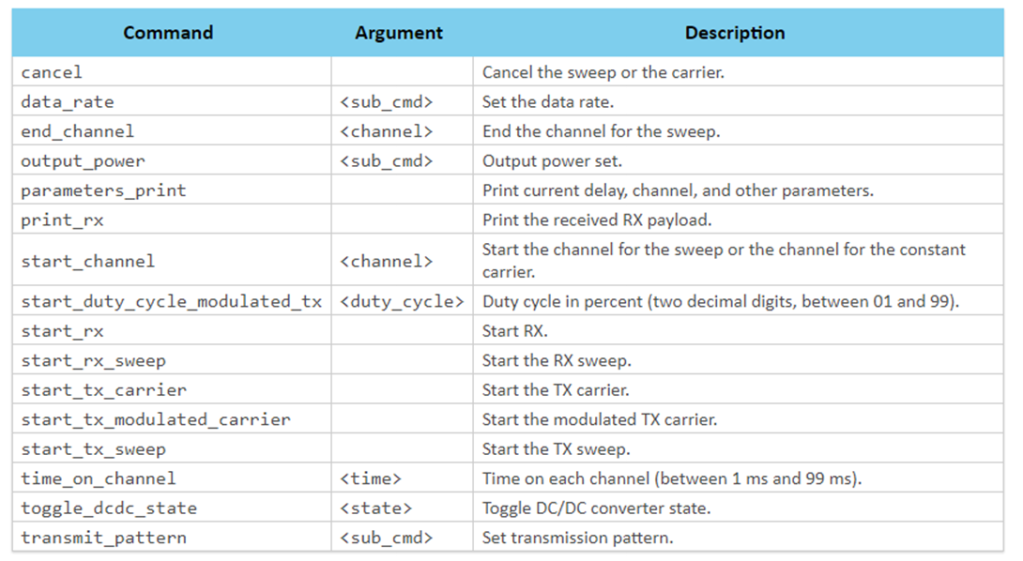
2. This test also utilizes a Command-based approach to send instructions for different parameter tests. Compared to DTM, Radio Test is more flexible, offering a wider range of RF parameters to test.
The connection method between the target board and PC, serial port modifications, and the approach with DTM are identical.


3. Use the command-Line interface (CLI) through the serial port to control and test the output power, bitrate, and channel settings of the radio parameters during testing.

Additionally, configure the CLI to enable the 32 MHz high-frequency crystal oscillator.

The application allows setting scanning mode with intervals ranging from 1 millisecond to 99 milliseconds (per 1 millisecond) for each channel.


4. Refer to the Nordic CLI commands documentation for the command testing method.

https://infocenter.nordicsemi.com/index.jsp?topic=%2Fcom.nordic.infocenter.sdk5.v15.2.0%2Fnrf_radio_test_example.html&cp=4_0_0_4_5_29_0&anchor=nrf_radio_test_example_commands

5.Testing

Lastly, we can utilize Spectrum to test PCBA RF characteristics.


Edited by Sales Manager: Ms. Vicky Huang
Raytac Corporation 勁達國際電子有限公司
A BT5.2 & BT5.1 & BT5 module maker based on Nordic nRF53 & nRF52 solution
(nRF5340 & nRF52840 & nRF52833 & nRF52832 & nRF52820 & nRF52811 & nRF528

Wednesday, March 28, 2018