Showing posts with label AN54LV. Show all posts

Thursday, July 2, 2026

Introducing Raytac's nRF54L15 AT Command Module Series – Pre-loaded firmware with Lower Power Consumption

 [CA, USA/Taipei, Taiwan]


Raytac Group, a worldwide leader in wireless modules, wireless solutions, and a Nordic-recommended third-party module manufacturer, is pleased to announce the official release of the AN54LQ-AT and AN54LV-AT series, our newest Bluetooth® Low Energy AT Command modules built upon Nordic Semiconductor's nRF54L15 ultra-low-power wireless SoC.

Designed for engineers who want to integrate BLE quickly and easily, the AT Command series comes with pre-loaded peripheral (slave) role firmware, enabling straightforward UART communication with a host MCU through simple AT Commands.
Built on Nordic's next-generation nRF54L15 SoC, the series delivers exceptional power efficiency, reducing power consumption by approximately 50% compared to previous-generation nRF52-based AT Command modules.


The nRF54L15 AT Command family is available in five variants to satisfy different RF and mechanical requirements.

AN54LQ Series
- Ceramic chip antenna: AN54LQ-AT (Click here for full product details)
- PCB trace antenna: AN54LQ-PAT (Click here for full product details)
- u.FL connector for external antenna: AN54LQ-UAT (Click here for full product details)

AN54LV Series
- Ceramic chip antenna: AN54LV-AT (Click here for full product details)
- PCB trace antenna: AN54LV-PAT (Click here for full product details)

AT Command Development Kit
- AN54LQ Series: AN54LQ-AT-UART-S (Click here for full product details)
- AN54LV Series AN54LV-AT-UART-S (Click here for full product details)


The standard AN54LQ family measures only 9.5 × 13.7 × 1.8 mm, while the AN54LV family further reduces the footprint to just 6.4 × 8.4 × 1.5 mm, making it an excellent choice for wearable devices, portable products, industrial sensors, medical devices, and other space-constrained applications.

Engineers can integrate Bluetooth communication(peripheral role) into an existing MCU platform without implementing the Bluetooth LE protocol or maintaining a Bluetooth LE firmware stack.

Acting as a seamless bridge between the host MCU and Bluetooth devices, the AT Command module enables easy wireless communication without any complexity of firmware development.


Technical Overview

Category
Specification
Series
AN54LQ and AN54LV
Antenna Options
Chip antenna, PCB antenna, u.FL (external antenna)
Bluetooth® Certification
Bluetooth® 6.0 certified
RF Certifications
FCC, IC, UKCA, CE, TELEC (MIC), KC, SRRC, NCC, RCM, WPC
Processor
128 MHz Arm® Cortex®-M33 processor + 128 MHz RISC-V coprocessor
Security
Enhanced security aligned with EU Cyber Resilience Act (CRA) requirements
Interfaces
UART(Bluetooth Connectivity via UART AT Commands)
Key Features
- Rich AT Command(Peripheral/Slave Role) set, No firmware development needed
- Up to 50% Lower Power Consumption vs. nRF52-based AT Command Modules
- Selectable 1 Mbps / 2 Mbps PHY Data Rate
- Custom UUID Configuration (Hex Format)
- Built-in Power Saving & GPIO Wake-Up Functions
- Advertising/Connection Control
- RSSI, Battery Monitoring & Device Management


List of supported commands

  • Setting of device name
  • Choose data rate of 1Mbps or 2Mbps on-air
  • Set TX output power in 6 levels.
  • Set advertising time
  • Set connection interval under Mode 2
  • Enable/disable advertising
  • 8 sets of UART baud rates
  • Enable/disable UART flow control
  • Enable/disable interface of UART hardware
  • Power-down mode for power saving and GPIO wake-up
  • Recover-to-default setting with hardware and software method
  • System reset of hardware and software
  • Set serial number and retrieve
  • Set or retrieve MAC Address
  • Retrieve ADC value for battery detection, delivering the information through battery service.
  • Enable/disable connection command mode
  • Setting of advertising interval
  • Retrieve RSSI value of the connected


The modules are already in Mass Production.

Please subscribe to Raytac’s Blogger: https://raytaccorp.blogspot.com/ for more upcoming information.

Welcome to send an inquiry to any of the below links:
Raytac Corporation contact form: https://www.raytac.com/contact/
Raytac Corporation mailbox: sales@raytac.com

abietec Inc. contact form: https://www.abietec.com/contact
abietec Inc. mailbox: service@abietec.com

to discuss how Raytac/abietec can support your project.

Let's keep in touch!


Raytac Corporation 勁達國際電子股份有限公司 / Raytac Corporation (USA) / abietec Inc.
A Bluetooth, Wi-Fi, and LoRa Module Maker/ODM & OEM Manufacturer based on
Nordic nRF54; nRF53: nRF52; nRF51; nRF7002
Infineon: CYW55912
NXP: RW610, RW612
Semtech: SX1262

Bluetooth Specification: BT6 ; BT5.4 ; BT5.3 ; BT5.2.
Wi-Fi Specification: Wi-Fi 6
LoRa Specification: LoRaWAN
Zephyr Project Silver Member

All products are FCC/IC/CE/Telec/KC/RCM/SRRC/NCC/WPC/RoHS/Reach Certified.

Tel: +886-2-3234-0208(TW)/+1-626-328-3827(USA)

Wednesday, June 17, 2026

User Manual of Raytac AN54LV-DB-15 (Nordic nRF54L15 Module DevKit) Development & Programming Environment

Want to get started quickly with Raytac's AN54LV-15 module? We provide a simple tutorial to guide you step-by-step through setting up the development and programming environment for the nRF54L15 module Development Board (AN54LV-DB-15) and nRF54L15-DK.


Table of Contents
1. Hardware Environment Setup
2. Software Development Kit Resources and Environment Setup
3. Software/Firmware Application Development
4. Flashing / Programming

Related products:
nRF54L15 SoC Spec  << access link
Nordic nRF54L15 DK  << access link
Raytac AN54LV-DB-15 (Development Kit used in this article) << access link
Zephyr documentation of AN54LV-DB-15 << access link
Raytac AN54LV-DB-U15 (Development Kit with u.FL Connector for external antenna) << access link
Raytac AN54LV-DB-K15 (Development Kit with antenna pin) << access link

User manual of Raytac AN54LQ-DB-15 << access linkNordic nRF54L15-DK


1. Hardware Environment Setup
The required equipments are as follows:

  • 1 x Nordic nRF54L15-DK: PCA10156(1.0.0)
  • 1 x AN54LV-DB-15 (Raytac nRF54L15 module Development Board)
  • 1 x IDC Ribbon Cable
  • 2 x USB Type-C Connection Cables

* Reminder: The "Nordic nRF54L15-DK" and "Raytac AN54LV-DB-15 Development Board" must be used together to proceed with application development and flashing firmware into the Raytac AN54LV-DB-15 development board.

Setup Steps:
Step 1: Connect the J-Link on the Nordic DK with the AN54LV-DB-15 using the IDC ribbon cable.


Make sure to match the red side of the IDC ribbon cable with "1" printed on the AN54LV-DB-15's J-Link socket.


Step 2: Use the Type-C USB cables to supply power to both the nRF54L15-DK and the AN54LV-DB-15.


The outcome should be same as the picture above.

Step 3: AN54LV-DB-15 Schematic(Click on the schematic to zoom in):


2. Software Development Kit Resources and Environment Setup
Software Tool kits & Download Links:
Download nRF Connect for Desktop: Download nRF Connect For Desktop (Please Click Me)
Download nRF Command Line Tools: Download nRF Command Line Tools (Please Click Me)
Download Visual Studio Code(VS Code): Download nRF Command Line Tools (Please Click Me)

Setup Steps:
Step 1: Download the latest version of nRF Connect for Desktop. Choose the Windows 64-bit - version 5.3.1 installer (nrfconnect-setup-5.3.1-x64.exe). Once finished, you will see " nRF Connect for Desktop" on your PC.

Step 2: Download the latest version of nRF Command Line Tools. Choose the Windows X86 64 - version 10.24.2 installer (nrf-command-line-tools-10.24.2-x64.exe)

* Reminder: During the installation of the above two programs, a window may pop up prompting that SEGGER J-LINK needs to be installed or updated concurrently.

If you’re initiating Segger Embedded Studio (SES) application, please check the guideline here(Click me)\


Step 3: Download the latest version of Visual Studio Code (VS Code). Choose Windows VSCodeUserSetup-x64 version 1.122 (VSCodeUserSetup-x64-1.122.1.exe). Once complete, you will see "Visual Studio Code" on your PC.

Step 4: After installation is complete, you can verify the installed packages in your PC's Control Panel under "Programs and Features":


3. Software/Firmware Application Development
You can develop application programs within the VS Code IDE development environment.
Below steps are how to install and select your target SDK version (nRF Connect SDK v3.3.0 in this article):

Step 1: Launch "VS Code"-> Select "nRF Connect" icon/extension on the side menu.


Click "Manage SDKs" and then select "Install SDK".


Step 2: Select "nRF Connect SDK".


Step 3: You will see several available versions of nRF Connect SDK vx.x.x. It is highly recommended to choose and install NCS v3.3.0 or later. In this guide, we select nRF Connect SDK(NCS) v3.3.0.


Step 4: Before starting the download for (NCS)v3.3.0, confirm your preferred target installation pathway.
By default, it is configured to c:\ncs\v3.3.0. Press 'Enter' to confirm.


Step 5: Once the nRF Connect SDK v3.3.0 environment setup finishes successfully, open the Bluetooth sample folder and select the "peripheral_uart" application template, then click "Open".


Step 6: In the "nRF Connect" layout, go to "Applications" --> "Add build configuration".


Under "Board target", look up and select "nrf54l15dk/nrf54l15/cpuapp" --> "Generate and Build".


* Note: You can also choose the board name “raytac_an54lv_db_15/nrf54l15/cpuapp” for subsequent building and development.


After completing the configuration, you will see "Build complete".


Step 7: Compilation completed. Once completed, a binary file named "zephyr.hex" will be generated in your "build" directory.


Step 8: Under the "ACTIONS" interface, you can switch between Build, Debug, and Flash functionalities dynamically.

Build


Debug


Flash


Step 9: CRITICAL BEFORE FLASHING/DEBUGGING: You have to change the VDD voltage configuration on the nRF54L15-DK board to 3.3V.

To do this: Launch "nRF Connect for Desktop" -> choose "Board Configurator" -> click "Open"


Change the VDD target selection value to "3.3V" -> click "Write config".


4. Flashing / Programming
The nRF Connect SDK (NCS) natively supports direct programming.
You can utilize the "Programmer" application tool to flash the compiled zephyr.hex binary file onto the target chip.
The exact procedure is detailed below:

Step 1: Open "nRF Connect for Desktop" -> select "Programmer" and click "Open".


Click "Select Device" and choose "nRF54L15DK".


Click "Add file".


Step 2: Select your compiled target ".hex" file.


Click "Erase & write" to initiate the programming/flashing process.


While flashing, a progress diagonal pattern will display on the right-hand panel.


When the LOG shows a "completed" status text, it means that the programming/flashing is successfully done.


Step 3: After the flash operation completes, you can download the "nRF Connect for Mobile" app to scan and verify that the Raytac AN54LV-DB-15 development board is advertising normally.

"nRF Connect for Mobile" app download link: https://www.nordicsemi.com/Products/Development-tools/nRF-Connect-for-mobile


Useful References
nRF Connect SDK Documentation: https://developer.nordicsemi.com/nRF_Connect_SDK/doc/3.3.0/nrf/index.html

Nordic DevZone(technical support forum): Nordic Devzone for technical issue discussion


Edited by Account Manager: Christine Huang
Technical Guidance by R&D Manager: MW Lee

Raytac Corporation 勁達國際電子股份有限公司 / Raytac Corporation (USA) / abietec Inc.
A Bluetooth, Wi-Fi, and LoRa Module Maker/ODM & OEM Manufacturer based on
Nordic nRF54; nRF53: nRF52; nRF51; nRF7002
Infineon: CYW55912
NXP: RW610, RW612
Semtech: SX1262

Bluetooth Specification: BT6 ; BT5.4 ; BT5.3 ; BT5.2.
Wi-Fi Specification: Wi-Fi 6
LoRa Specification: LoRaWAN
Zephyr Project Silver Member

All products are FCC/IC/CE/Telec/KC/RCM/SRRC/NCC/WPC/RoHS/Reach Pre-Certified.

http://www.raytac.com
https://www.raytac.com/contact/
https://www.abietec.com/
email: sales@raytac.com
Tel: +886-2-3234-0208(TW)/+1-626-328-3827(USA)

Monday, February 2, 2026

Raytac Group Showcases Next-Generation Wireless Solutions at Embedded World 2026


New Taipei, Taiwan / Los Angeles, USA, 02/02/2026

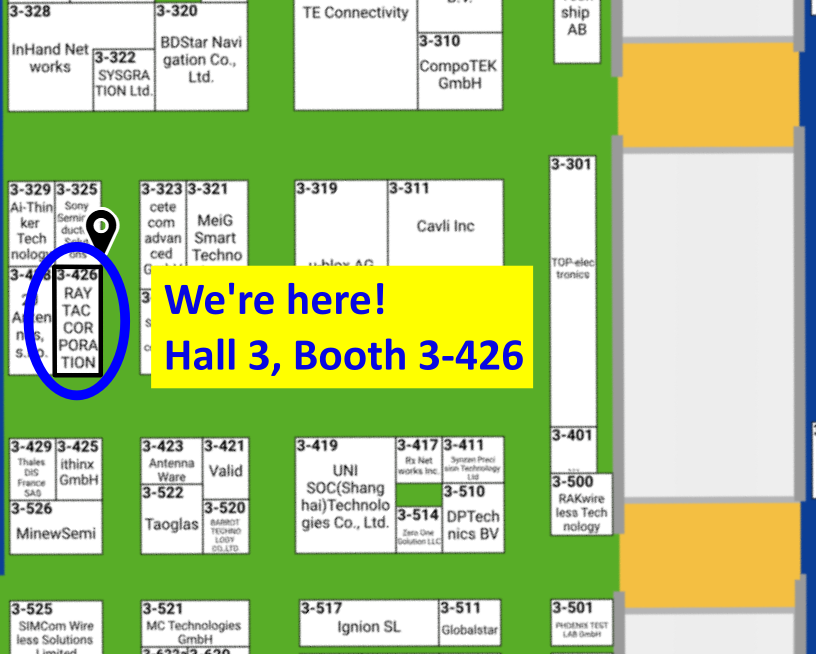
Raytac Group, together with Raytac Corporation (USA) and abietec Inc., will exhibit at Embedded World 2026, taking place March 10–12, 2026, at the Nürnberg Convention Center, Germany.

Visit us at Hall 3, Booth 3-426 to discover how Raytac is driving the future of wireless connectivity — from ultra-low-power Bluetooth® modules to advanced Wi-Fi and system-level solutions.

At the show, Raytac will showcase:

  • Announcement on our AN54LM series: NordicSemi nRF54LM20A modules and dongles that powers up the IoT market with lower power consumption and High speed USB. 
  • (Product link click me)
  • New Nordic nRF54L15 & 10 & 05 series modules: AN54LQ and AN54LV, built for Bluetooth 6.0 with ultra-low power, strong RF performance, coming up with 4 form factors and 7 antenna types
  • New Wi-Fi + BLE dongle based on the Nordic nRF7002 and nRF5340 solutions
  • live demos from our partners’ applications
  • Channel Sounding demo showcasing enhanced ranging accuracy and RF performance
  • How Raytac’s ecosystem and design partners help you accelerate product development.
abietec Inc. will showcase:

  • Bluetooth + Wi-Fi combo modules powered by Infineon CYW55912 chipset
  • Comprehensive OEM/ODM design services supporting a wide range of wireless applications.

Stop by our booth to see live demos, discuss your next project with our engineers, and learn how Raytac and abietec can help bring your wireless ideas to life.

We’re waiting for you at:
Embedded World 2026
📍 Nürnberg Convention Center, Germany
📅 March 10–12, 2026
📌 Hall 3, Booth 3-426


Let Raytac and abietec power your next innovation: from concept to connected reality!

Tuesday, October 7, 2025

Raytac & abietec Join the Embedded World North America 2025!


  [New Taipei, Taiwan / Los Angeles, USA]


We’re thrilled to announce that 
Raytac Group, including Raytac Corporation(USA) and abietecInc., will be joining Embedded World North America 2025, in November 4-6 at the Anaheim Convention Center, CA.

Come find us at Booth #5067 !

This year, we’re bringing lots of exciting news:

From Raytac:

  • Brand-new Nordic nRF54L series modules: AN54LQ and AN54LV(Product Link), built for Bluetooth® LE 6.0 with ultra-low power and strong RF performance.
  • A full Channel Sounding demo on how precise measurement of multipath and distance can enhance real-time location accuracy, improve signal reliability, and optimize antenna placement.
  • Introducing you to our Ecosystem, including all our partners and technologies used in various applications.
  • Discover how our modules can reduce development time and costs, making your projects more efficient.
  • One-on-one consultations with our experts to help you find the right solutions for your needs.

From abietec:

  • ODM/OEM design services for everything wireless: Bluetooth®, Wi-Fi, mmWave, LoRa, NB-IoT…
    You name it!

More importantly,
Stop by our booth to explore new products, join fun interactive games, and win prizes!

Let Raytac & abietec be your bridge to product success, connecting great ideas with real-world wireless solutions.

We’re waiting for you at:
Hall C – Level 1
Booth 5067

For more details, don’t forget to check out:
1. Our website: http://www.raytac.com
2. Our LinkedIn:  https://www.linkedin.com/company/raytac/?viewAsMember=true
3. Our WordPress Blog:  https://raytac.blog/


Monday, August 25, 2025

Raytac's Impact on the Zephyr Ecosystem - Little Module, Huge Potential


In this article, Stanley Huang, MSc, Deputy Manager of Firmware Development at Raytac, shares insights on how Raytac’s modules and development kits strengthen the Zephyr ecosystem.


[Stanley Huang, New Taipei City]

When we talk about open-source platforms like Zephyr RTOS, most people immediately think of major chip manufacturers such as ST Micro, NXP, or Nordic. But to me, what truly makes Zephyr famous amongst the developer community is through modules that developers can actually touch: those they can instantly plug in and start using right away. In these terms, Raytac is one of the most underrated and important contributors in this ecosystem.


Raytac Modules Make Zephyr More Accessible

Instead of being a chip vendor, we specialize in producing high-quality, globally certified modules - especially Bluetooth and Wi-Fi modules based on Nordic chipsets, such as the AN7002Q, AN54LQ, AN54LV, MDBT53, MDBT50Q, and MDBT42Q.
All these modules are already certified with Regional RF compliances(FCC, IC, CE, KC, etc.) and the latest Bluetooth Specifications, offering developers the assurance of “plug and play” and “production-ready” solutions.
We assure that our modules have become one of the easiest platforms for Zephyr developers to test BLE functionality.

I paired Zephyr with Raytac’s MDBT50Q-DB-40 development board when I first applied Zephyr in a BLE Peripheral project . With a simple west build -b nrf52840dk_nrf52840 followed by flashing the firmware using J-Link or nRF Connect for Desktop, the BLE beacon immediately showed up on my phone. Clean, simple, noise-free, and developer-friendly - that's Raytac's style.


Modules play an invaluable role in product development

Many would say Raytac only makes modules and the real core is still Nordic’s SoC.
But I believe that in an open-source system like Zephyr, the hardware that helps your project runs first is that which contributes the most.
Our Zephyr-registered development kits eliminate the hassles of manual soldering, regulatory certification, and antenna design, allowing engineers to fully focus on developing applications based on Zephyr.
They can run Zephyr’s BLE peripheral, central, GATT, and HCI samples directly on the Raytac kits that act as a one-stop hardware solution.
In many ways, Raytac has pushed Zephyr’s usability a significant step forward.


Raytac Also Expands Zephyr’s Application Horizon

Many of Raytac’s modules are ultra-compact- ideal for wearables, smart sensors, and low-power beacons…etc. These are the scenarios where Zephyr excels, and Raytac’s modules provide the physical platform to enable companies to build their "dream devices".
When running Zephyr on a tiny module like the AN54LV-15, developers will be amazed that something smaller than a piece of corn kernel can run a full RTOS, manage the BLE stack, trigger timers, drive I2C sensors, and even connect to the cloud, all by itself.  This combination doesn’t just make development easier - it inspires developers to realize that: “they can build their projects using Raytac's hardware.”


Raytac may not be the star, but we're always ready for you

On Zephyr’s main stage, companies like Nordic, STM, and Intel take the spotlight, but Raytac plays an essential supporting role - supporting the performance from behind the scenes. We offer stable, high quality, and low-power platforms, giving every line of Zephyr code a place to run and every feature a cornerstone.
Our greatest value lies in helping developers skip antenna design and RF interference concerns - so they can jump right into the Zephyr ecosystem with ease.


Our products deliver the reliability you need and the efficiency you expect.


We invite you to explore more about how Raytac supports the Zephyr ecosystem and discover our range of development kits and modules designed for seamless integration.
Visit our Zephyr page here: https://docs.zephyrproject.org/latest/boards/raytac/index.html
Visit Zephyr's Ecosystem Vendors page: https://www.zephyrproject.org/ecosystem-vendor-offerings/

For more information, please contact:
Raytac Contact Form: https://www.raytac.com/contact/
Raytac Sales email: sales@raytac.com
abietec Service email: service@abietec.com

Wednesday, August 6, 2025

Essential Tips for nRF54L15 HEX File Verification


Hi readers, did you know that Raytac offers a special service exclusively for our customers? 😉

We offer support services: HEX file verification and flashing firmware into modules per customer's requests.
Compared to the series nRF52 and nRF53’s 2 in 1 or 3 in 1 merged hex files, nRF54L15 requires something slightly different. Following are the tips and suggestions.

Before building your own .hex file on Raytac's nRF54L15 modules(Product link), please configure some settings(shown below) in advance.

In VS Code:

  1. Go to Add Build Configuration
  2. Find System Build (sysbuild) ➝ Choose Build System Default
  3. Click Generate and Build


Starting from NCS v2.8.0 (including later versions), the .hex file can be generated in two different paths.
1. ..\nrf\samples\bluetooth\application-name\build\merged.hex
2. 
..\nrf\samples\bluetooth\application-name\build\application-name\zephyr\zephyr.hex


Using the AN54LQ/AN54LV series as an example:
When you provide the programming file (.hex) for production, please ensure that the file is taken from the following path:
1. ..\nrf\samples\bluetooth\application-name\build\merged.hex
And we also do not recommend renaming the merged HEX file due to Nordic suggestions.

For more details behind this suggestion, please refer to the Nordic DevZone link below.
https://devzone.nordicsemi.com/f/nordic-q-a/120313/how-to-modify-the-name-of-the-merged-hex-file


Suggested path:
1. ..\nrf\samples\bluetooth\application-name\build\merged.hex


Not recommended path:
2. ..\nrf\samples\bluetooth\application-name\build\application-name\zephyr\zephyr.hex
The zephyr.hex file is not recommended to be used for flashing or verification in the production process.

Thank you all for your patience in reading!
Best wishes for your projects - your success is Raytac’s success! 😊


For more information, please contact:
Raytac Contact Form: https://www.raytac.com/contact/
Raytac Sales email: sales@raytac.com
abietec Service email: service@abietec.com


Edited by Account Manager: Ms. Elfreda Guo


Raytac Corporation 勁達國際電子股份有限公司 / Raytac Corporation (USA) / abietec Inc.
A Bluetooth, Wi-Fi, and LoRa Module Maker/ODM & OEM Manufacturer based on
Nordic nRF54; nRF53: nRF52; nRF51; nRF7002
Semtech Specification: SX1262


Bluetooth Specification: BT6 ; BT5.4 ; BT5.3 ; BT5.2.
Wi-Fi Specification: Wi-Fi 6
LoRa Specification: LoRaWAN


All products are FCC/IC/CE/Telec/KC/RCM/SRRC/NCC/WPC/RoHS/Reach Pre-Certified.
http://www.raytac.com
https://www.raytac.com/contact/
email: sales@raytac.com
Tel: +886-2-3234-0208(TW)/+1-626-217-3139(USA)

Monday, July 28, 2025

Nordic’s nRF54L15/L10/L05 BLE Modules from Raytac now in Mass Production

Raytac AN54LQ series Modules: Guiding Your Project at Every Turn, While Saving Power at Every Step


[28/07/2025, New Taipei, Taiwan]
We are proud to officially announce Mass Production (MP) for Raytac’s next-gen Nordic-based Bluetooth LE modules:

Just like traffic lights that direct every journey safely and efficiently, Raytac’s nRF54L series modules guide your wireless development—keeping you on the right path with cutting-edge performance and exceptional power savings.

🚦 Each light signals a different member of the nRF54L15 / nRF54L10 / nRF54L05 module family—showcasing a clear path for your Bluetooth Low Energy (LE) applications, no matter which industry you’re from and where you’re headed.

These modules are now available for your design-in, offering:
✅ Powerful performance
✅ Ultra-low power consumption
✅ Compact footprints
✅ Full Global certifications: FCC/IC/CE/UKCA/Telec/KC/NCC/SRRC/RCM/WPC
✅ BT 6.0 certified
✅ Full Nordic nRF54 Series compatibility
✅ Pin-to-pin compatible amongst AN54LQ series

Whether you’re building for consumer IoT, industrial sensors, healthcare, or wearables—Raytac’s modules deliver the reliability you need and the efficiency you expect.

For more information, please contact:
Raytac Contact Form: https://www.raytac.com/contact/
Raytac Sales email: sales@raytac.com
abietec Service email: service@abietec.com


Edited by Business Development Manager: Tony Yin


Raytac Corporation 勁達國際電子股份有限公司 / Raytac Corporation (USA) / abietec Inc.
A Bluetooth, Wi-Fi, and LoRa Module Maker/ODM & OEM Manufacturer based on
Nordic nRF54; nRF53: nRF52; nRF51; nRF7002
Semtech Specification: SX1262

Bluetooth Specification: BT6 ; BT5.4 ; BT5.3 ; BT5.2.
Wi-Fi Specification: Wi-Fi 6
LoRa Specification: LoRaWAN


All products are FCC/IC/CE/Telec/KC/RCM/SRRC/NCC/WPC/RoHS/Reach Pre-Certified.
http://www.raytac.com
https://www.raytac.com/contact/
email: sales@raytac.com
Tel: +886-2-3234-0208(TW)/+1-626-217-3139(USA)