Monday, December 12, 2022

How To USE Nordic Connect SDK (NCS) Flashing Built Code into nRF5340 Module

Intro:  With the ready built code of zephyr.hex file for net core and application core individually, we would like to proceed code flashing into the MDBT53/53V Nordic nRF5340 BLE module.


Step1.  

Execute nRF Connect >>  Programmer  > > Open


Step2. 

Click “SELECT DEVICE” >> Find icon of “nRF5340 DK” which is detected by the programmer app


Step3. 

Click icon of “nRF5340 DK” >> “Erase All” to remove the flash memory from MDBT53/53V BLE Module


Step4.

Click “Add File” to load the net core zephyr.hex and application core zephyr.hex both into programmer


Step5.

Do “Erase & Write ” to execute the flashing process for both zephyr.hex into memory of MDBT53/53V Module.


Step6.

To validate the wireless broadcast of default name “Nordic_UART_Service” from MDBT53/53V Module, please check on the “nRF Connect for mobile” APP and do “Scan device” through your mobile.   Once the device name is detected in your mobile , the wireless connection is successfully done.


You may find more resources in below link:

Hardware set up works
"How To Get started with Nordic nRF5340 Project by Raytac MDBT53/MDBT53V Development Kit Demo Board"

Firmware development:
"How To Get Started With nRF5340 Module Program Coding and Compiling" (Click Me)


 Edited by Jocelyn Tsai / Account Manager

 Raytac Corporation 勁達國際電子有限公司

A BT5.3 & BT5.2 & BT5.1 module maker based on Nordic nRF53 & nRF52 solution 
(nRF5340 & nRF52840 & nRF52833 & nRF52832 & nRF52820 & nRF52811 & nRF52810 & nRF52805)
www.raytac.com email: service@raytac.com Tel: +886.2.3234.0208


Friday, November 25, 2022

How To Get started with MDBT53/53V Demo Board Set up (MDBT53-DB-40 /MDBT53V-DB-40)

Here provides the easy introduction to the article of Hardware & Firmware Set upwith step-by-step guideline for nRF5340 Module demo board

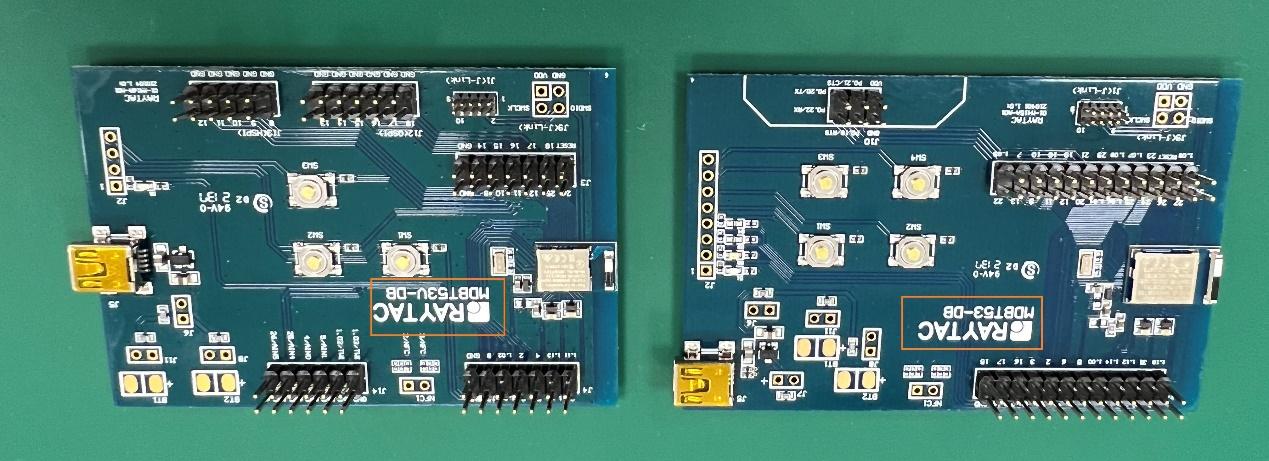
MDBT53-DB-40/MDBT53V-DB-40


一張含有 文字, 電路, 電子用品 的圖片

自動產生的描述

  1. Hardware Set Up

  2. Software Kits Resource & Preparation

  3. To recognize your nRFConnect SDK version case by case


  1. Hardware Set Up


  • 1 x Nordic nRF5340-DK Board: PCA10095(2.0.0)

  • 1 x MDBT53-DB-40 or 1x MDBT53V-DB-40

  • 1 x IDC Wire 

  • 1 x Power Micro USB 

  • 1 x Power Mini USB 


**Reminder:

Both “Nordic nRF5340-DK” and “Raytac MDBT53/53V Demo BD”

should be included into the working network for program development.


Where to buy MDBT53-DB-40 , MDBT53V-DB-40
MDBT53-DB-40 (nRF5340 Solution)
MDBT53V-DB-40 (nRF5340 Solution)


  • Using Nordic DK as J-Link ( nRF5340 DK ONLY) Connects with MDBT53/53V DB by IDC wire.

  • Powered up MDBT53/53V DB by Mini USB wire.

  • Powered up the nRF5340-DK by Micro USB wire.


  • 一張含有 文字, 電子用品, 電路 的圖片

自動產生的描述


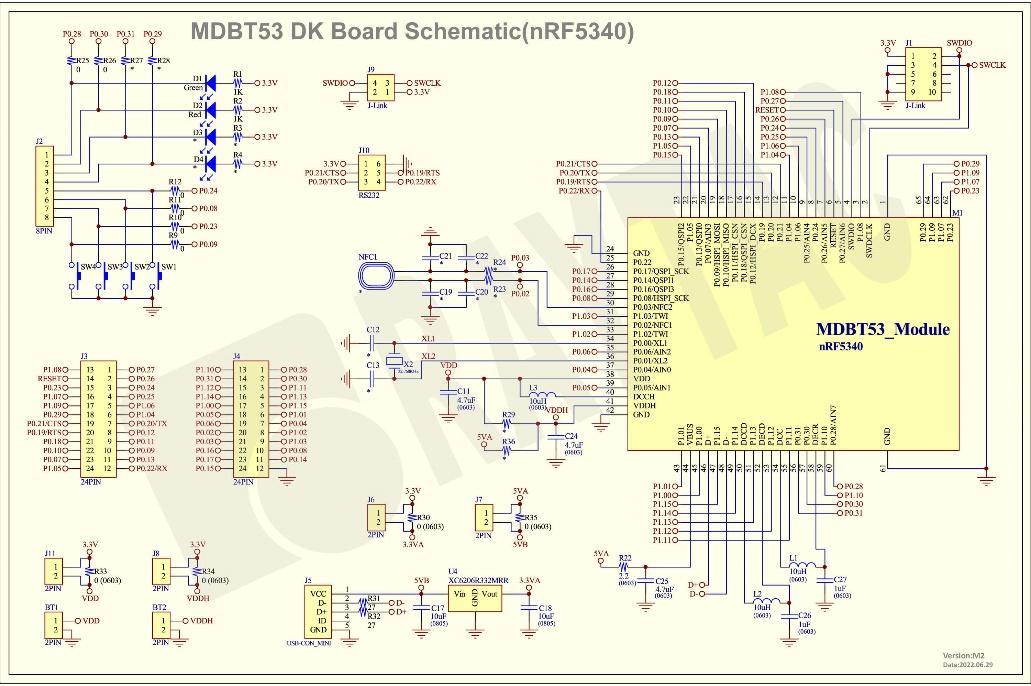
    MDBT53-DB-40 Schematic Diagram


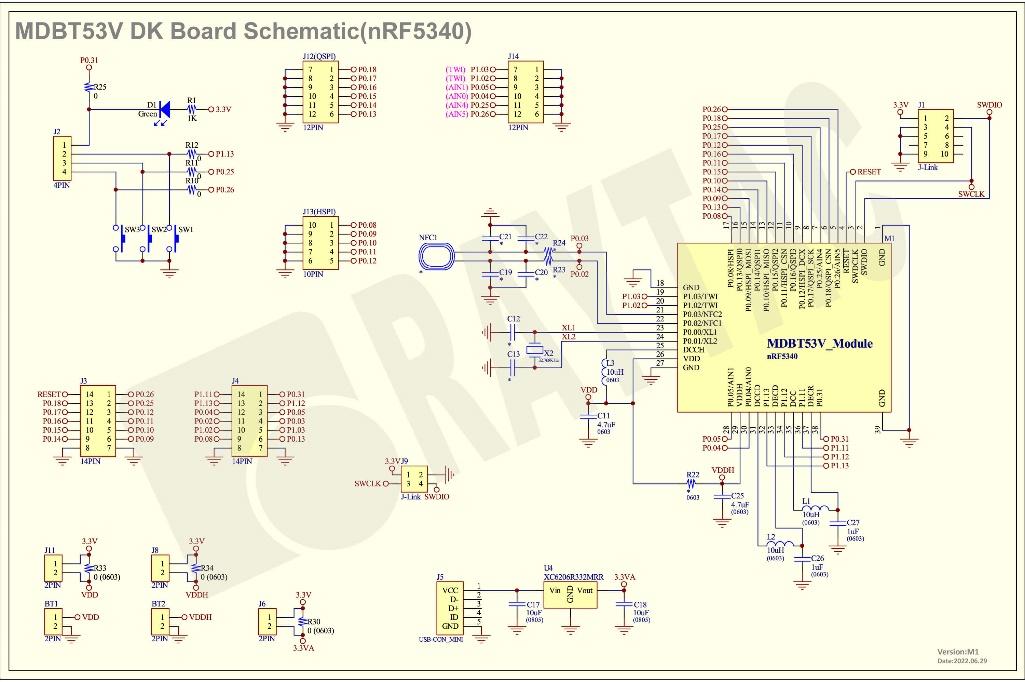
    MDBT53V-DB-40 Schematic Diagram


    1. Software Kits Resource & Preparation

    Download nRF Connect For Desktop (Please Click Me)

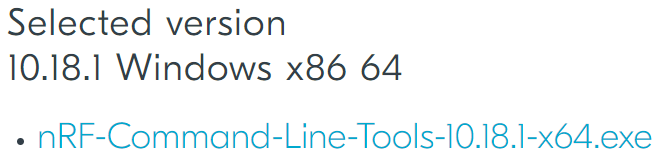
    Download nRF Command Line Tools (Please Click Me)


    Preparation


    1. Prepared with the latest version of nRF Connect for Desktop

     一張含有 文字 的圖片

自動產生的描述一張含有 文字, 標誌, 室外 的圖片

自動產生的描述


    2. Prepared with the latest version of nRF Command Line Tools


    一張含有 文字 的圖片

自動產生的描述


     **Note: SEGGER J-LINK Upgrade message might pop up while you’re doing above download.

     If you’re initiating Segger Embedded Studio (SES) application, please check the guideline here 


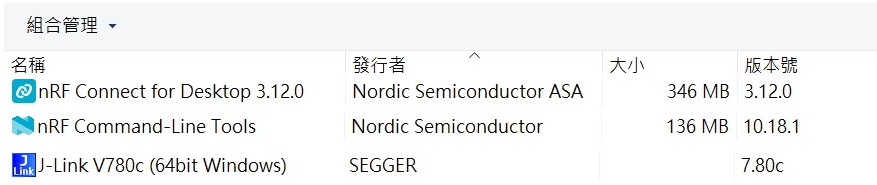
    3. Locate all the necessary kits for programming in PC (Check Software/Application list)

    一張含有 文字 的圖片

自動產生的描述


    1.3  To recognize your nRFConnect SDK version case by case


    Intro: The preparation of nRF Connect SDK Vx.x.x(NCS SDK version, ) and Nordic Example code will help you get through the program code building and trace debug in VS Code IDE or Segger Embedded Studio IDE. Here’s the brief way to recognize your nRFConnect SDK version which suits your project development.


    Step1.


      Activated your “nRF Connect for Desktop” 一張含有 文字, 標誌, 室外 的圖片

自動產生的描述 >> “Toolchain Manager” >> “Open” >> “Install”


    (**Note: The development nRF Connect SDK(NCS) provides with free VS Code IDE and Segger Embedded Studio IDE as compiling system)


    Step2.

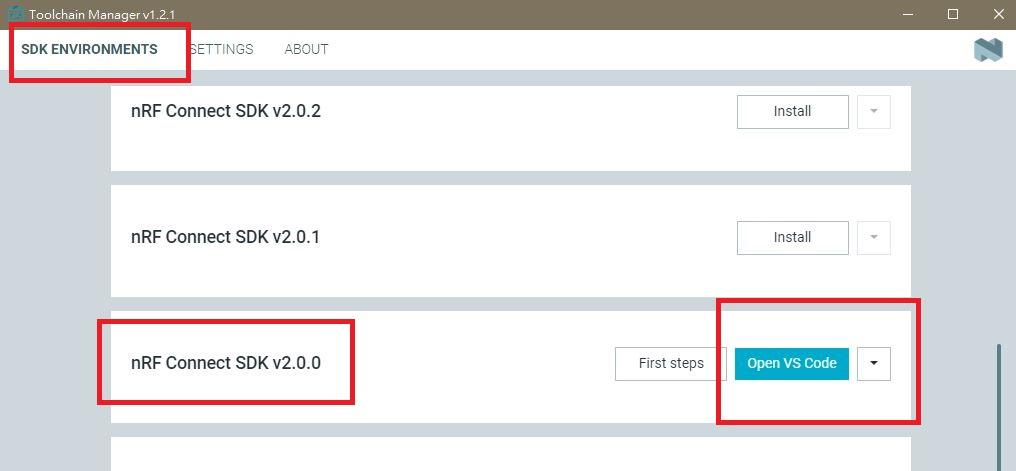
    To recognize your project is with or without Audio inquiry and download the “nRF Connect SDK(NCS)” by the following classification.


    A.) Project with Non-Audio case


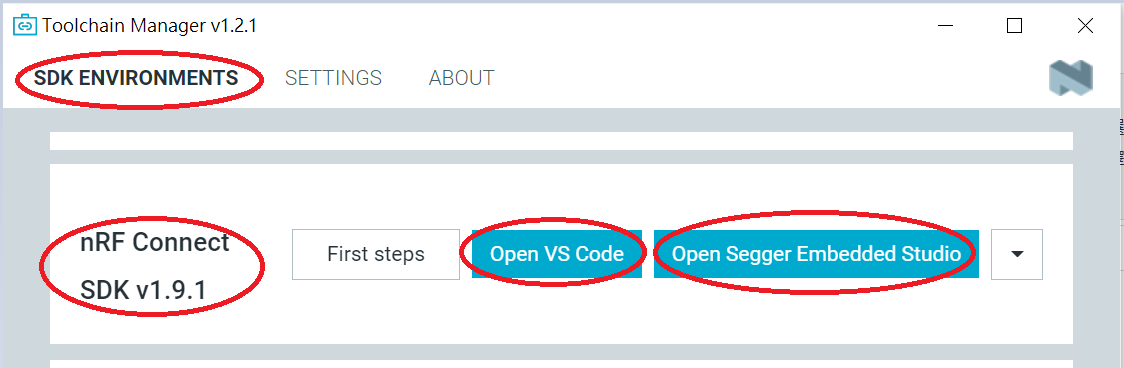
    Option1. Go with NCS V1.9.1 (Included) and previous version.

    There’re either “Open VS Code” or “Open Segger Embedded Studio” IDE options could be selected for program coding.

    一張含有 文字 的圖片

自動產生的描述

    Option2. Go with NCS V2.0.0(included) and the later.

     There’s simply “Open VS Code” IDE that could be run for program coding.


    B.) Project with “Audio” inquiry


    You would only have option of NCS V2.0.0(included) and the later version working in “Open VS Code” IDE.


    Step3.

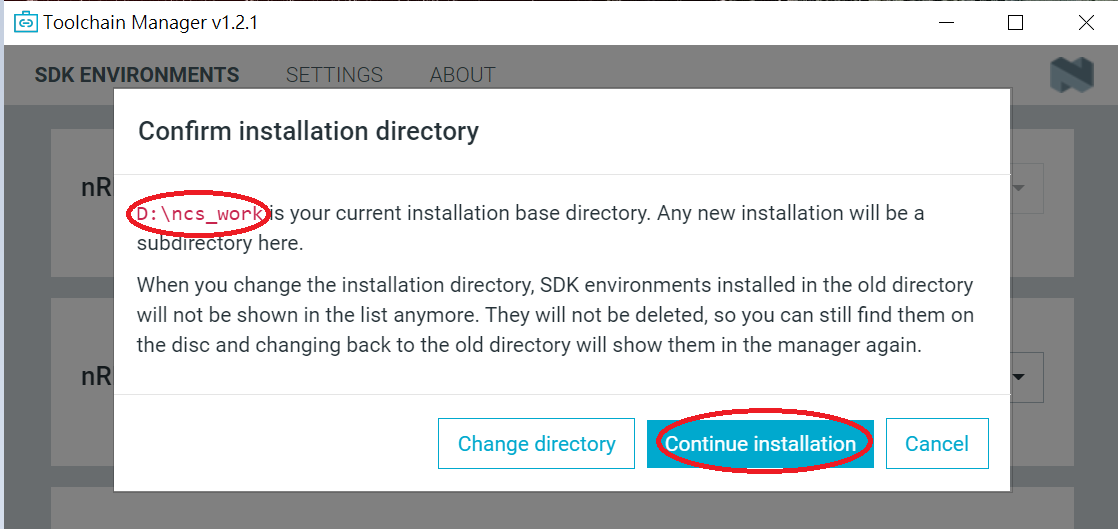
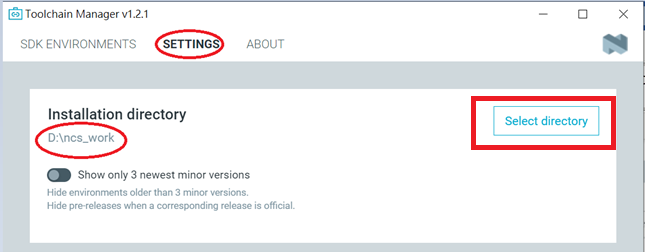
     Please make sure the nRFConnect SDK is installed at same base directory with compiling system  (the root of Open VS Code)


    (This is using D:\ncs-work base as example.)

     一張含有 文字 的圖片

自動產生的描述

     If the base is not directing to the same, do “Select directory’” to re-direct the route.


    Step4.


    nRFConnect SDK Vx.x.x Download ready


Find more information about nRF5340 Module firmware development resources in below link!


"How To Get Started With nRF5340 Module Program Coding and Compiling"


Edited by Jocelyn Tsai / Account Manager

 Raytac Corporation 勁達國際電子有限公司

A BT5.3 & BT5.2 & BT5.1 module maker based on Nordic nRF53 & nRF52 solution 
(nRF5340 & nRF52840 & nRF52833 & nRF52832 & nRF52820 & nRF52811 & nRF52810 & nRF52805)
www.raytac.com email: service@raytac.com Tel: +886.2.3234.0208


Monday, October 24, 2022

Raytac Extents Digi-Key's Product Listing and Shipping Destination

Digi-Key is the most well known channel for developers to access the sample during project planning and evaluation stage. To provide a speedy, easy sample purchase experience is really a committed promise Raytac persist in. Raytac is glad to announce we have successfully listed most of Raytac products in Digi-Key. Moreover, excepting US, and Asia, to included Europe in the available shipping regions is another remarkable update for this extension. 

Currently, Raytac offer a various of options listed in below, developers may find out the best and convenient channel to access sample purchase.

Digi-key

Amazon

Tindie

eBay

For developers who is not able to find the products, shipping destination or out of stock, please feel free to write to us at service@raytac.com, Raytac's sales team is always happy to fulfill your demand.

Raytac Corporation 勁達國際電子有限公司
A BT5.3 & BT5.2 & BT5.1 module maker based on Nordic nRF53 & nRF52 solution 
(nRF5340 & nRF52840 & nRF52833 & nRF52832 & nRF52820 & nRF52811 & nRF52810 & nRF52805)
www.raytac.com email: sales@raytac.com Tel: +886.2.3234.0208


Friday, September 23, 2022

New Distribution Partnership in Greater China Region

Raytac Corporation, a leading supplier of Bluetooth modules, announced a new distribution partnership with Weltrend Semiconductor, Inc. Weltrend has strong FAE team and their extensive footprint of distribution facilities makes them a valuable distribution partner. “We look forward to building our relationship and expanding the Greater China region to serve more customers.”

As a world-renowned supplier of BLE Bluetooth module, Raytac is dedicated to launching various kinds of modules to fulfill all developers’ needs and demands. Raytac’s modules are covered all Nordic solutions, including nRF51822, nRF52810, nRF52811, nRF52820, nRF52832, nRF52833, nRF52840 and nRF5340. Moreover, the modules are fully certified with not only Bluetooth SIG (QDID/DID/BQB), but also regional safety regulation in main areas such as FCC (USA), CE (EU), IC (Canada), TELEC (Japan), KC (Korea), SRRC (China), FCC(Taiwan), RCM (ANZ) , etc.

Raytac aims to build up a value chain to provide customers with a cost-effective and speed-time-to-market solution. Raytac also offers AT Command service allowing customers to adopt easily in IoT field.


Weltrend Semiconductor, Inc. Kaohsiung Branch, (Taipei Office)

Address: 11F-6, No. 736, Chungcheng Rd. Chungho District, New Taipei City 

http://www.weltrend.com.tw

Tel: +886.2.8226.9297


Raytac Corporation 勁達國際電子有限公司
A BT5.3 & BT5.2 & BT5.1 module maker based on Nordic nRF53 & nRF52 solution 
(nRF5340 & nRF52840 & nRF52833 & nRF52832 & nRF52820 & nRF52811 & nRF52810 & nRF52805)
www.raytac.com email: sales@raytac.com Tel: +886.2.3234.0208


Monday, July 18, 2022

Find nRF5340 module here!

Where to find nRF5340 module quickly?
The nRF5340 a dual core solution deployed with 2 Arm Cortex M33 processors. Not only provide faster and powerful for advanced applications, but also LE audio.
Raytac knows your anxiety and already distributed the modules available in several channels aimed to provide a speedy and comfortable way to get it.

Buy From AmazonBuy From Amazon